Haunt Your Gear with Halloween Gaming Controller SVGs
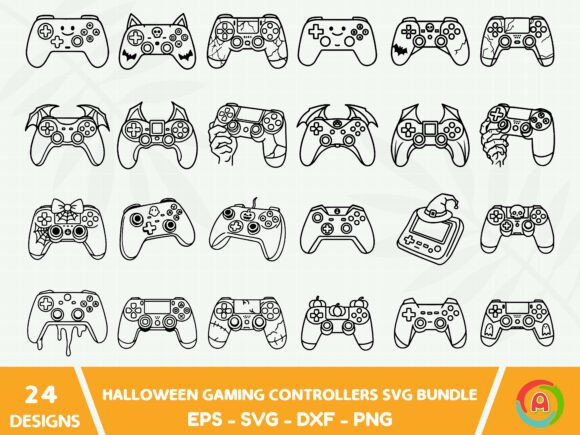
The Halloween Gaming Controllers Svg Bundle is a versatile collection of 100 vector shapes that merge the thrill of gaming with seasonal spookiness. You get a single Zip file packed with carefully crafted illustrations: gamepads wrapped in mummy bandages, controllers sprouting bat wings, analog sticks dripping with slime, and D-pads carved like jack-o'-lanterns. These designs aren’t just eye-catching—they arrive in SVG, EPS, DXF, and PNG formats, so you can use them anywhere from a commercial print run to a last-minute digital project. Because SVG is a vector file format, you can scale any element to billboard size without losing a pixel of clarity. The PNG files, on the other hand, give you high-resolution raster images with transparent backgrounds, perfect for quick mockups or social graphics.
What’s Inside the Halloween Gaming Controllers SVG Bundle?
When you unpack the Zip file, you’ll find four format folders, each containing the same 100 imaginative controller variations. This structure lets you jump straight into your preferred software without converting files. Here’s exactly what’s included:
- EPS Files – A print-ready professional standard, ideal for sending to a t-shirt press, a sticker manufacturer, or a large-format poster printer.
- PNG Files – Raster images at a crisp 300dpi, with transparent backgrounds. Perfect for layering on photos, creating digital stickers, or dropping into a blog post.
- SVG Files – The fully editable vector heart of the bundle. Change colors, remove details, or combine elements in any vector software without degrading quality.
- DXF Files – The go-to format for die-cutting machines like Cricut and Silhouette. Use these to cut vinyl decals, iron-on transfers, or paper crafts.
Because every design is purely vector-based, you get seamless scalability. Need a massive wall decal for a gaming lounge? The SVG won’t flinch. Want a tiny controller icon for an email newsletter? The clarity holds. The color palette is also easily adaptable; you can swap neon orange for blood red, or a pastel scheme for a kid-friendly event, all in a few clicks.
Why Vector Versatility Matters for Spooky Season Projects
Raster images have their place, but when you’re building merchandise or branded assets, vectors are non-negotiable. With the SVG files in this bundle, you can isolate a single controller silhouette and add your own text, or combine five designs into a seamless pattern for pajama pants. The editable layers let you recolor a ghastly green glow to match your brand palette exactly. Meanwhile, the included PNG files serve as ready-to-use placeholders or standalone graphics. If you’re a designer who frequently jumps between Adobe Illustrator, CorelDRAW, and a cutting machine, the mix of EPS, PDF, DXF, and SVG formats keeps your workflow smooth. You aren’t locked into one ecosystem; you can share the EPS with a print shop, import the DXF into Cricut Design Space, and post the PNG on social media—all from the same bundle.
Creative Ways to Use Your Halloween Game Controller Designs
The real excitement starts when you move beyond the file list and think about applications. These controller graphics carry a universal gaming nostalgia that resonates with everyone from retro arcade fans to modern esports enthusiasts. Adding a Halloween twist makes them instantly seasonal and highly shareable.
Print-on-Demand Merchandise
If you run a print-on-demand store, a bundle like this can anchor a limited-time collection. Place a glowing, cobweb-draped controller on a black hoodie, or arrange three zombie-controller variants in a row on a tote bag. Because the files are high resolution at 300dpi, the prints stay crisp even on large canvases. Platforms like Redbubble, Printful, or Etsy integrate easily with PNG and SVG uploads. A small business owner could launch a “Haunted Arcade” line featuring controllers, retro fonts, and dripping slime accents—all spun from the same bundle.
Custom Apparel and Accessories
Beyond t-shirts, think about snapback caps with an embroidered “pumpkin controller” patch, or pillows shaped like a gamepad with a witch’s hat. The DXF files are ready for heat-transfer vinyl, so you can make one-off Halloween pajama sets for a family gaming night. The PNG files work beautifully for sublimation on mugs: imagine a mug where the controller’s thumbsticks turn into candy corns. Since you have 100 vector shapes, you can mix and match elements—take the bat wings from one design and add them to a classic SNES-style controller from another, creating a hybrid that’s uniquely yours.
Party Decorations and Invitations
Hosting a Halloween gaming tournament or a themed birthday party? Use the SVG files to design banners that spell out “Game On” with each letter held by a skeletal controller hand. DXF cutouts can become window decals or cupcake toppers. A blogger could craft a printable invitation suite: the front shows a misty forest with a floating controlled, and the editable SVG lets you type event details directly into the design file before exporting a print-ready PDF. The adaptability means you can use the same graphic set for both physical decor and digital evites, keeping the event’s visual identity cohesive.
Digital Content and Social Media Graphics
Content creators and streamers can tap the PNG files for quick Halloween overlays. A Twitch streamer might add a cauldron-bubbling controller in the corner of their “Just Chatting” frame, while a YouTuber could make a thumbnail where their face is reflected in a possessed gamepad. Because the colors are editable, you can nudge the palette to match your channel’s brand without breaking the spooky vibe. The bundle even works for Instagram carousels: slice one controller into three panels and reveal a different Halloween detail on each slide.
Tailoring the Artwork for Different Audiences
Not every audience wants the same level of fright. A marketer designing ads for a family-friendly gaming café will likely soften the edges—choose a controller with cartoonish spider eyes instead of hyper-realistic gore, and set the palette to purples and oranges. An entrepreneur selling at a horror convention can push the same designs into grittier territory by adding distress textures and blood spatters. The editable SVG layers make these shifts possible without buying additional assets. Educators running a Halloween coding camp can even turn the controllers into friendly mascots for an “if-this-then-that” treasure hunt, printing them as stickers for the campers’ laptops.
Practical Tips for Flawless Results
To get the most from this bundle, start by unzipping the folder and creating a master “originals” backup. Then organize your working copies into project folders: clothing, stickers, digital. When you edit the SVG, always save a new version—this way, you can revert to the clean vector if a color experiment goes sideways. For print jobs, double-check that you’re using the 300dpi PNG or placing the EPS file properly; vector formats never need to be “upscaled,” but a misstep in export settings can rasterize them. If you’re cutting vinyl, run a test on cardstock first to ensure the DXF lines are clean. Consistency across a product line is what builds a recognizable brand, so pick a tight color story from the start and apply it across all designs. The bundle’s flexibility is a strength, but without a clear theme, your merch can feel scattered.
Where Halloween Gaming Controller Graphics Shine Brightest
Consider a local gaming lounge that orders 50 t-shirts for a Halloween lock-in event—using a single controller silhouette with a glow-in-the-dark ink they mixed themselves. A freelancer might bundle five controller designs into a mini sticker pack and sell it on Gumroad, marketing it to D&D groups who want to decorate their character sheets. A hobbyist could produce a set of embroidered patches for their airsoft team, each patch featuring a different “undead” controller rank. Even a publisher putting together a Halloween-themed activity book for kids could use the PNG files to create connect-the-dots or color-by-number pages. The Halloween Gaming Controllers Svg Bundle bridges the gap between niche gaming culture and mainstream seasonal decor, so it fits naturally into dozens of product categories.
Elevating Your Spooky Creations with Smart Design Choices
Don’t stop at simply placing a graphic on a blank canvas. Layer a controller over a subtle plaid background for a cozy fall homespun vibe, or mask it inside a silhouette of a haunted house. Since the SVG is editable, you can duplicate the outline of a controller and use it as a clipping mask for a photo of your game room. If you’re designing for a screen, test your colors on a real device; what looks like a deep crimson on your monitor might skew pink on a phone. Always keep your audience’s context in mind: a giant, sparkly controller on a toddler’s t-shirt needs a different treatment than a grim, dark image for a metal band’s tour merch. By combining technical know-how with the bundle’s built-in adaptability, you’ll create work that feels intentional and professional—exactly the kind of gear people want to wear, share, and remember long after Halloween ends.